

What is this feature?
The Organizational References feature allows enterprise Playlab Organizations to create and manage a central collection of references that can be shared across all members and workspaces within the organization. This provides seamless access to important knowledge files, curricular materials, organizational frameworks, and anything else that might be useful throughout your entire organization.This feature is available only to those who have enterprise Playlab Organizations.
Rationale for the feature
Organizations often have essential knowledge bases, curricular files, and frameworks that need to be accessible across multiple teams and projects. Organizational References eliminates the need for individual uploads and ensures that all organization members have access to the most current, authoritative versions of critical materials, creating singular sources of truth across your entire organization.Watch How to Use Organizational References
How to use Organizational References
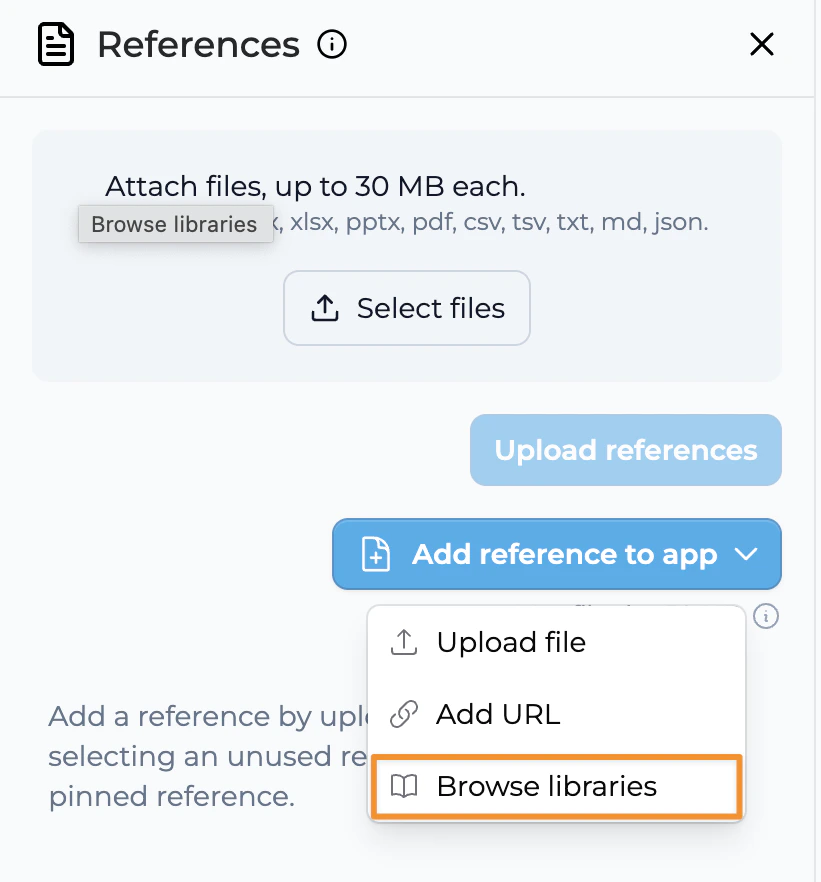
Upload references to your organizational library
Click “Upload organizational references” to add references to your organization’s central reference library.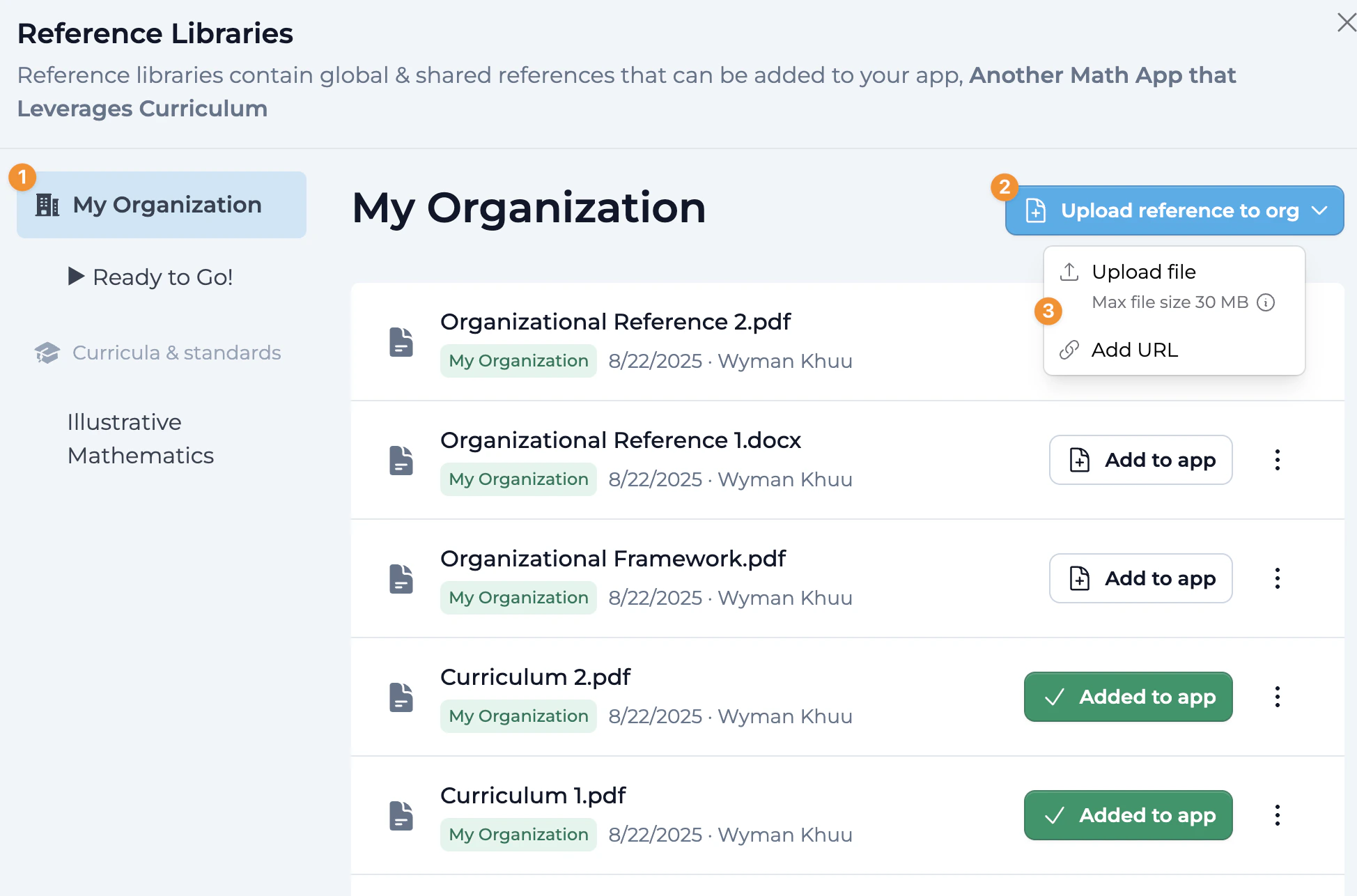
Add references to your app with one click
Click “Add to App” to attach relevant organizational references to your specific Playlab app.
- Once added, you will see a green check mark indicator, confirming the organizational reference is now attached to your Playlab app.
- You can easily remove organizational references from your app by clicking the remove option, giving you full control over which references are active.
Best Practices for Organizational References
FAQ
What makes Organizational References different from Workspace References?
What makes Organizational References different from Workspace References?
Organizational References are available to all members across your entire enterprise organization, spanning multiple workspaces. Workspace References are limited to a specific workspace, while Organizational References provide organization-wide access to critical materials.
Who can access Organizational References?
Who can access Organizational References?
Anybody who has the ability to build in your enterprise Playlab Organization can access and use the references in the organizational library, ensuring consistent access to important materials across teams and projects.
Can I control who can add or modify Organizational References?
Can I control who can add or modify Organizational References?
Yes, organizational administrators can manage permissions for organizational references, ensuring only authorized personnel can make changes to critical organizational materials.
What types of materials work best as Organizational References?
What types of materials work best as Organizational References?
Curricular files, organizational frameworks, brand guidelines, compliance documents, training materials, and any knowledge base that multiple teams or departments need to access regularly work well as organizational references.
How do Organizational References impact app performance?
How do Organizational References impact app performance?
Like other references, we recommend being selective about which organizational references you attach to each individual app to maintain optimal performance, even though the organizational library can contain many references.
What happens when I update an Organizational Reference?
What happens when I update an Organizational Reference?
When you update an organizational reference, the changes are automatically reflected in all apps across the organization that use that reference, ensuring everyone has access to the most current version.
Can I use both Organizational and Workspace References in the same app?
Can I use both Organizational and Workspace References in the same app?
Yes, you can combine organizational references (available organization-wide) with workspace-specific references in the same Playlab app, giving you flexibility in how you structure your reference materials.
What happens if I leave the organization?
What happens if I leave the organization?
If you leave the organization, you will lose access to organizational references. However, any apps you’ve created that used these references will need to have alternative references added if you want to continue using them outside the organization.
Are there size limits for Organizational References?
Are there size limits for Organizational References?
While there are practical size limits for individual files, the organizational reference library is designed to accommodate a wide range of reference materials. For very large files, consider breaking them into more manageable components.
We Want Your Feedback!
Have you tried using the Organizational References feature? We’d love to hear about your experience and how it’s helping your organization maintain consistency across projects!Contact us at support@playlab.ai
Last updated: 8/22/2025